
Free Resume Builder: How to Build a Job-Winning Resume for $0 in 2026
Key Takeaways
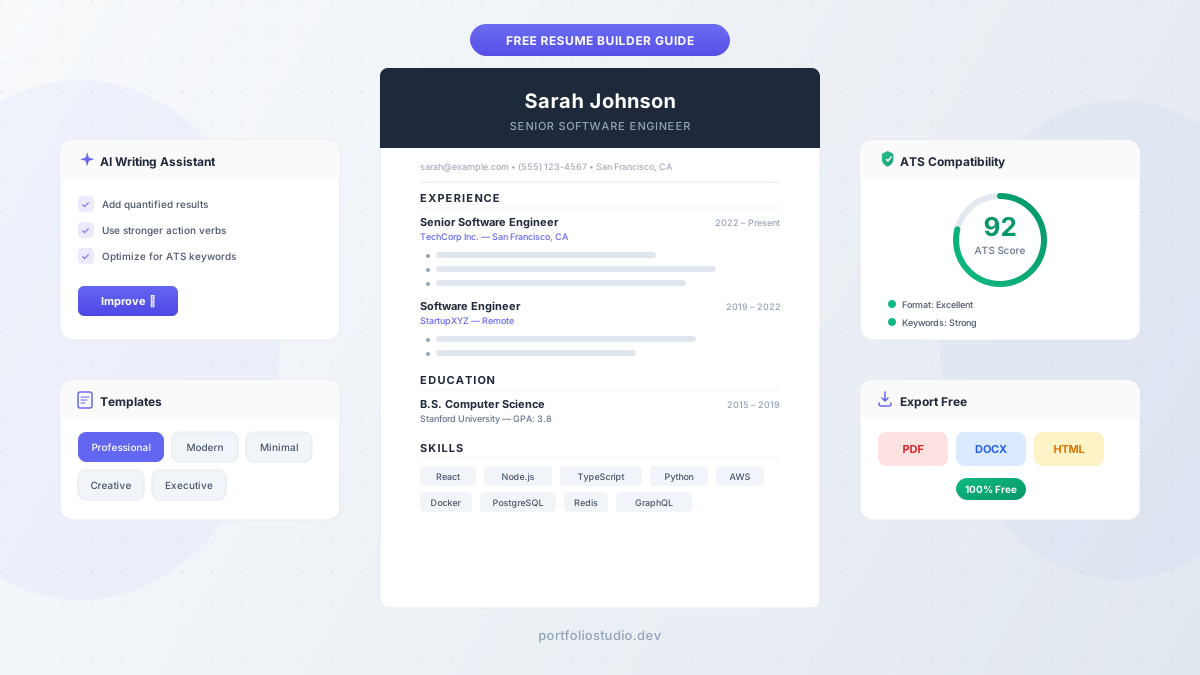
- A free resume builder can produce professional, ATS-friendly resumes — you don’t need to pay for premium tools or hire a resume writer
- Over 70% of resumes are rejected by Applicant Tracking Systems before a human ever sees them, so formatting matters more than fancy design
- AI resume builders can speed up the writing process, but you should always edit AI-generated content to sound authentic
- The best free resume makers let you export as PDF or DOCX with no hidden paywalls — look for tools that don’t gate downloads behind a credit card
- Tailoring your resume to each job description is the single most impactful thing you can do, and free tools make it easy to create multiple versions
Why You Need a Resume Builder (And Why Free Is Enough)
Let’s be honest: most people dread writing their resume. You stare at a blank document, struggle with formatting, and wonder whether your bullet points sound impressive enough. A free resume builder eliminates the hardest parts — layout, formatting, and structure — so you can focus on what actually matters: your content.
The good news? You don’t need to spend money. The gap between free and paid resume tools has narrowed dramatically in 2026. Free resume makers now offer professional templates, AI writing assistance, and multiple export formats that were premium-only features just two years ago.
The bad news? Not every “free” tool is genuinely free. Some let you build your resume for free but charge you to download it. Others lock AI features, premium templates, or PDF export behind a paywall. We’ll help you navigate that landscape in this guide.
Whether you’re a recent graduate writing your first resume, a professional updating for a career change, or someone returning to the workforce after a gap — this guide walks you through building a resume that gets past automated screening and into the hands of a real human.
What Makes a Resume “ATS-Friendly” (And Why It Matters)
Before choosing a template or writing a single word, you need to understand ATS — Applicant Tracking Systems. These are the software programs that most mid-to-large companies use to filter resumes before a recruiter ever sees them.
According to Indeed’s career research, the majority of Fortune 500 companies use some form of ATS. Studies suggest that up to 70% of resumes are filtered out at this stage — not because the candidates aren’t qualified, but because the resume formatting confused the software.
Here’s what ATS-friendly means in practice:
- Simple, single-column layouts — avoid two-column designs, sidebars, and text boxes that confuse parsers
- Standard section headings — use “Experience,” “Education,” and “Skills,” not creative alternatives like “My Journey” or “Toolbox”
- No graphics, icons, or images — ATS can’t read them. That star-rating for your skills? The software sees nothing
- Standard fonts — Helvetica, Arial, Calibri, or Times New Roman. Decorative fonts can render as garbled text
- PDF or DOCX format — PDF preserves formatting universally; DOCX is preferred by some older ATS systems
The best free resume builders handle all of this for you by offering templates that are already ATS-optimized. That’s why choosing the right tool matters — a beautiful template that breaks ATS parsing is worse than a plain Word document.
How to Choose the Right Free Resume Builder
Not all free resume builders are created equal. Here’s what to look for:
Truly Free Export
The most common bait-and-switch: you spend 30 minutes building your resume, click “Download,” and hit a paywall. Before investing time in any tool, verify that PDF and DOCX export are free. Tools like Portfolio Studio’s resume builder let you export in multiple formats with no charge and no account required.
ATS-Tested Templates
A template that looks stunning on screen might fail ATS parsing completely. Look for builders that explicitly label their templates as “ATS-friendly” or provide an ATS compatibility score. Avoid templates with:
- Sidebar layouts with contact info in a side column
- Heavy use of color blocks or background fills
- Tables used for layout (rather than content)
- Header/footer content (ATS often ignores these regions)
AI Writing Assistance
Modern AI resume builders can help you write bullet points, suggest action verbs, and improve phrasing. This is genuinely useful — especially if you’re struggling to articulate your accomplishments. But treat AI as a starting draft, not a final product (more on this below).
LinkedIn Import
If your LinkedIn profile is up to date, look for a builder that can import your data directly. This saves significant time and ensures you don’t forget to include past roles or skills. Some tools accept LinkedIn PDF exports or LinkedIn data export ZIP files.
Multiple Templates
Your resume for a creative agency should look different from your resume for a bank. A good free resume maker offers at least 3–5 templates across professional, modern, and creative styles so you can match the tone to your target industry.
Step-by-Step: Building Your Resume With a Free Resume Builder
Step 1: Pick Your Template
Start with an ATS-friendly template that matches your industry:
- Professional/Classic — best for corporate, finance, legal, and traditional industries
- Modern — works well for tech, startups, and mid-career professionals
- Minimal — ideal for academic positions or when you want the content to speak for itself
- Creative — suitable only for design, marketing, or creative roles where visual flair is expected (but be careful with ATS)
Rule of thumb: when in doubt, go professional. You’ll never lose points for a clean, traditional layout. You can lose points for a creative template that doesn’t parse correctly.
Step 2: Write Your Header and Contact Info
Keep it simple and scannable:
- Full name (use the name you go by professionally)
- Job title or target role (e.g., “Senior Software Engineer” or “Marketing Manager”)
- Email address (professional — no “coolgamer99@hotmail.com”)
- Phone number
- Location (city and state/country are sufficient — no full address needed)
- LinkedIn URL (shortened with a custom slug if possible)
- Portfolio or personal website (if you have one — and if you don’t, consider building one)
Step 3: Craft Your Professional Summary
This is the 2–3 sentence pitch at the top of your resume. It should answer: who you are, what you do best, and what you’re looking for.
Bad example:
“Hard-working professional seeking a challenging position where I can utilize my skills and grow.”
Good example:
“Full-stack engineer with 6+ years building scalable web applications in React and Node.js. Led a team of 4 engineers to ship a payment platform processing $2M+ in monthly transactions. Looking to bring my expertise in distributed systems to a senior engineering role.”
Notice the difference? The good example is specific, quantified, and action-oriented. Most AI resume builders can help you improve a rough draft into something like this — but you need to provide the raw details first.
Step 4: Describe Your Experience With Impact
This is where most resumes fall flat. The biggest mistake? Listing responsibilities instead of accomplishments.
Responsibilities (weak):
“Responsible for managing social media accounts”
Accomplishments (strong):
“Grew Instagram following from 5K to 45K in 8 months through a data-driven content strategy, increasing website traffic by 32%”
For each role, aim for 3–5 bullet points that follow this formula:
Action verb + what you did + measurable result
Great action verbs to use: Led, Built, Designed, Increased, Reduced, Launched, Optimized, Delivered, Automated, Negotiated.
Harvard’s career services guide recommends starting every bullet point with a strong action verb and including quantified results wherever possible. Even if you don’t have exact numbers, estimates work: “Reduced page load time by ~40%” is far better than “Improved website performance.”
Step 5: Add Education, Skills, and Optional Sections
Education: List your degree, institution, graduation date, and GPA only if it’s above 3.5 (or if you’re a recent graduate). For experienced professionals, education can be brief — your work history matters more.
Skills: List technical and professional skills that match the job description. This is one of the highest-impact sections for ATS because the software scans for specific keywords. If the job posting says “project management,” your skills section should include “project management” — not “PM” or “managing projects.”
Optional sections that can strengthen your resume:
- Certifications — especially valuable in tech, healthcare, and finance
- Projects — great for recent graduates or career changers who lack traditional experience
- Languages — list only if relevant to the role or if you have professional-level proficiency
- Volunteer work — helps fill gaps and demonstrates initiative
How AI Resume Builders Actually Work
AI resume builders have become a major selling point, but what do they actually do? Understanding this helps you use them effectively rather than blindly trusting the output.
Most AI resume builder tools use large language models to:
- Generate bullet points from a brief description of your role (e.g., you type “managed social media” and get a polished bullet point with metrics language)
- Improve existing text by making it more concise, action-oriented, or professional
- Suggest keywords based on common job description language for your industry
- Tailor content to a specific job posting by matching your experience to the requirements
When AI Helps
- Breaking writer’s block — getting a first draft on paper is the hardest part
- Professional phrasing — AI is excellent at turning informal descriptions into polished resume language
- Keyword optimization — AI can identify important terms you might miss
When AI Falls Short
- Generic output — if you don’t provide specific details, AI generates vague, interchangeable bullet points that could describe anyone
- Factual accuracy — AI might inflate your accomplishments or add details you didn’t provide. Always fact-check every bullet point
- Authentic voice — hiring managers increasingly recognize AI-generated text. If every bullet point follows the same “Spearheaded X, resulting in Y% improvement in Z” formula, it reads as robotic
The best approach: Use AI to generate a first draft, then rewrite each bullet point in your own voice with your real numbers and specific details. The AI saves you from the blank page; your edits make it yours.
Common Free Resume Builder Mistakes That Cost Interviews
Even with a great tool, these mistakes can undermine your resume:
1. Using the Same Resume for Every Application
This is the single biggest mistake job seekers make. Each job posting emphasizes different skills and requirements. Tailoring your resume to each application — adjusting your summary, reordering bullet points, and mirroring keywords from the job description — can double your response rate.
Free resume builders make this easy because you can duplicate and edit without starting from scratch.
2. Choosing Design Over Function
That two-column creative template with the dark sidebar looks great as a screenshot. But if the ATS can’t parse it, the recruiter never sees it. Function first, design second — always choose an ATS-friendly template unless you’re certain the company doesn’t use automated screening (small companies, design agencies, or when you’re handing your resume directly to the hiring manager).
3. Leaving AI Placeholder Text Unchanged
Some builders include example bullet points like “Managed a team of X employees.” If you forget to customize these, your resume reads as a template — and recruiters notice instantly.
4. Ignoring File Format
When the job posting says “upload your resume as a PDF,” submit a PDF. When it says DOCX, submit DOCX. When it doesn’t specify, PDF is the safest default because it preserves formatting across devices. But keep a DOCX version ready — some older ATS systems prefer Word documents.
5. Burying Important Information
Recruiters spend an average of 6–7 seconds on an initial resume scan. Put your strongest qualifications near the top. If you have 10 years of relevant experience, don’t hide it below an education section from 2012.
Free Resume Builder Tips by Career Stage
Recent Graduates
- Lead with education and relevant coursework
- Highlight internships, projects, and campus leadership
- Include a skills section heavy on technical skills and tools you’ve learned
- Don’t stress about a one-page limit, but keep it tight — most new grads can fit on one page
Career Changers
- Write a professional summary that bridges your old and new industries
- Emphasize transferable skills: leadership, communication, project management, data analysis
- Include relevant certifications or courses that show commitment to the new field
- Consider a combination (functional + chronological) resume format
Returning After a Gap
- Address the gap briefly in your summary if it was significant (1+ year)
- Highlight any freelance work, volunteering, or coursework during the gap
- Focus on your most recent relevant experience
- Use a professional summary to contextualize your career trajectory
Freelancers and Contractors
- Treat each major client or project as a separate entry under Experience
- Quantify results for each engagement
- Include a skills section that reads like a services overview
- Consider grouping short contracts under a single “Freelance [Role]” heading with notable clients listed
Your Resume Is Step One — What Comes Next
A polished resume gets you interviews. But in 2026’s competitive job market, a resume alone isn’t always enough. Hiring managers increasingly want to see your work — not just read about it.
That’s where a portfolio website comes in. While a resume tells recruiters what you’ve accomplished, a portfolio shows them. It’s especially valuable for developers, designers, marketers, and anyone in a creative or technical field.
If you’ve just built your resume, consider turning that content into a full portfolio website. Portfolio Studio lets you describe your experience and skills, then generates a professional portfolio site with AI — often in under 5 minutes. It’s a natural next step after your resume is ready.
Frequently Asked Questions
Is there a truly 100% free resume builder?
Yes. Several resume builders let you create, edit, and download your resume in PDF or DOCX format with no charge. Look for tools that don’t require a credit card or account to export. Portfolio Studio’s free resume builder is one example — all features including AI writing assistance and multi-format export are free.
What’s the best file format for my resume?
PDF is the safest default. It preserves your formatting across all devices and operating systems. However, some older ATS systems parse DOCX files more reliably. If the job posting specifies a format, always follow their instructions.
Can AI write my entire resume?
It can generate a complete draft, but you shouldn’t submit it as-is. AI-generated resumes tend to be generic and may include inaccurate details. Use AI to break through writer’s block and polish your language, then customize every section with your real accomplishments and specific numbers.
How long should my resume be?
- 0–10 years of experience: one page
- 10+ years or senior/executive roles: two pages
- Academic CVs: as long as needed (3+ pages is common)
The one-page “rule” is more of a guideline. If your second page has strong, relevant content, include it. If you’re padding to fill a second page, cut back to one.
Should I include a photo on my resume?
In the US, UK, and Canada — no. It can introduce unconscious bias and some ATS systems flag resumes with images. In parts of Europe and Asia, photos are more common, but check local norms for your target market.
How often should I update my resume?
Update your resume every 3–6 months, even if you’re not actively job hunting. Add new accomplishments, certifications, and skills while they’re fresh. When an opportunity appears, you’ll be ready to apply immediately rather than scrambling to remember what you did last year.
Ready to Build Your Resume?
You now have everything you need to create a professional, ATS-friendly resume without spending a dime. Pick a free resume builder, follow the steps in this guide, and start applying with confidence.
Try Portfolio Studio’s Free Resume Builder →
No sign-up required. Choose a template, fill in your details, and export as PDF or DOCX — completely free, no charge.
And when you’re ready to take the next step, turn your resume into a full portfolio website with AI — it’s the best way to stand out in a competitive job market.
Ready to build your portfolio?
Create a professional portfolio website in minutes with AI. No coding required.
Try Portfolio Studio FreeRelated Articles
Portfolio Website for Job Seekers: What to Include to Get Interviews
Learn what a portfolio website for job seekers should include, from projects and proof to recruiter-friendly structure, messaging, and SEO.
Student Portfolio Website: How to Land Internships With Class Projects
Learn how to create a student portfolio website for internships and first jobs using class projects, coursework, hackathons, and personal work.
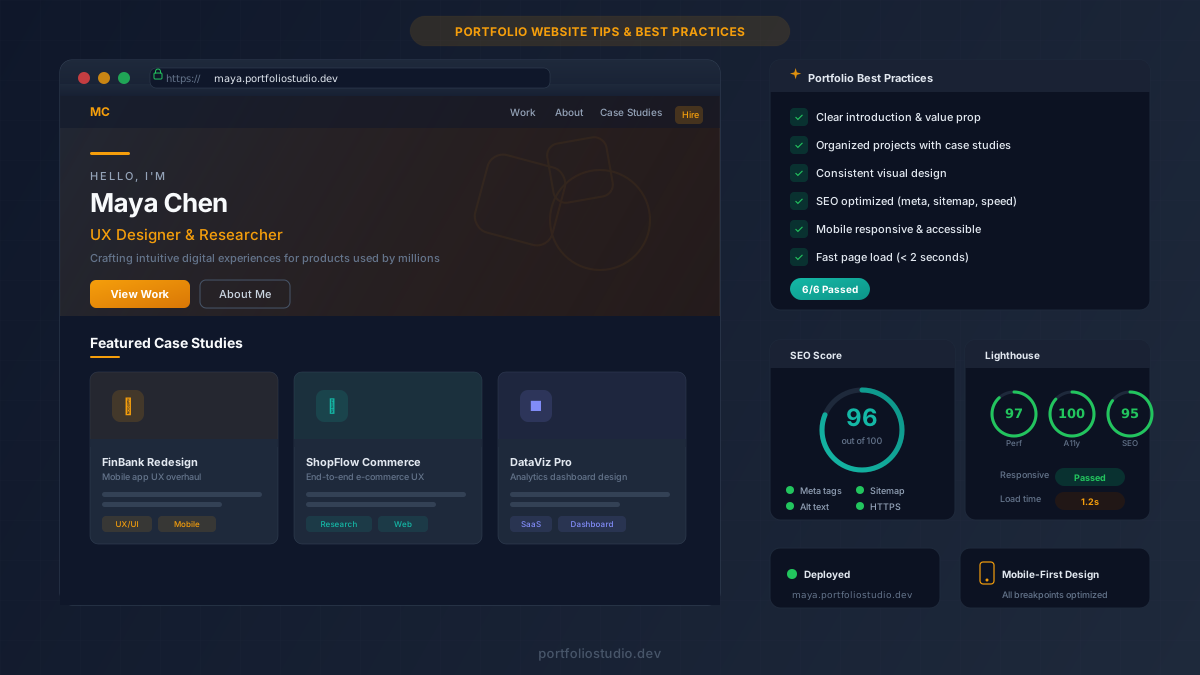
Build an Impressive Portfolio Website: Tips & Best Practices for 2026
Learn how to build a portfolio website that wins clients and lands jobs. Covers design, SEO, case studies, and promotion tips for every career.